# VibeVoice-ASR
**VibeVoice-ASR** is the latest addition to the **VibeVoice** family. While the original VibeVoice / VibeVoice-Realtime focused on expressive TTS, **VibeVoice-ASR** focuses on understanding long-form speech with high precision and rich metadata.
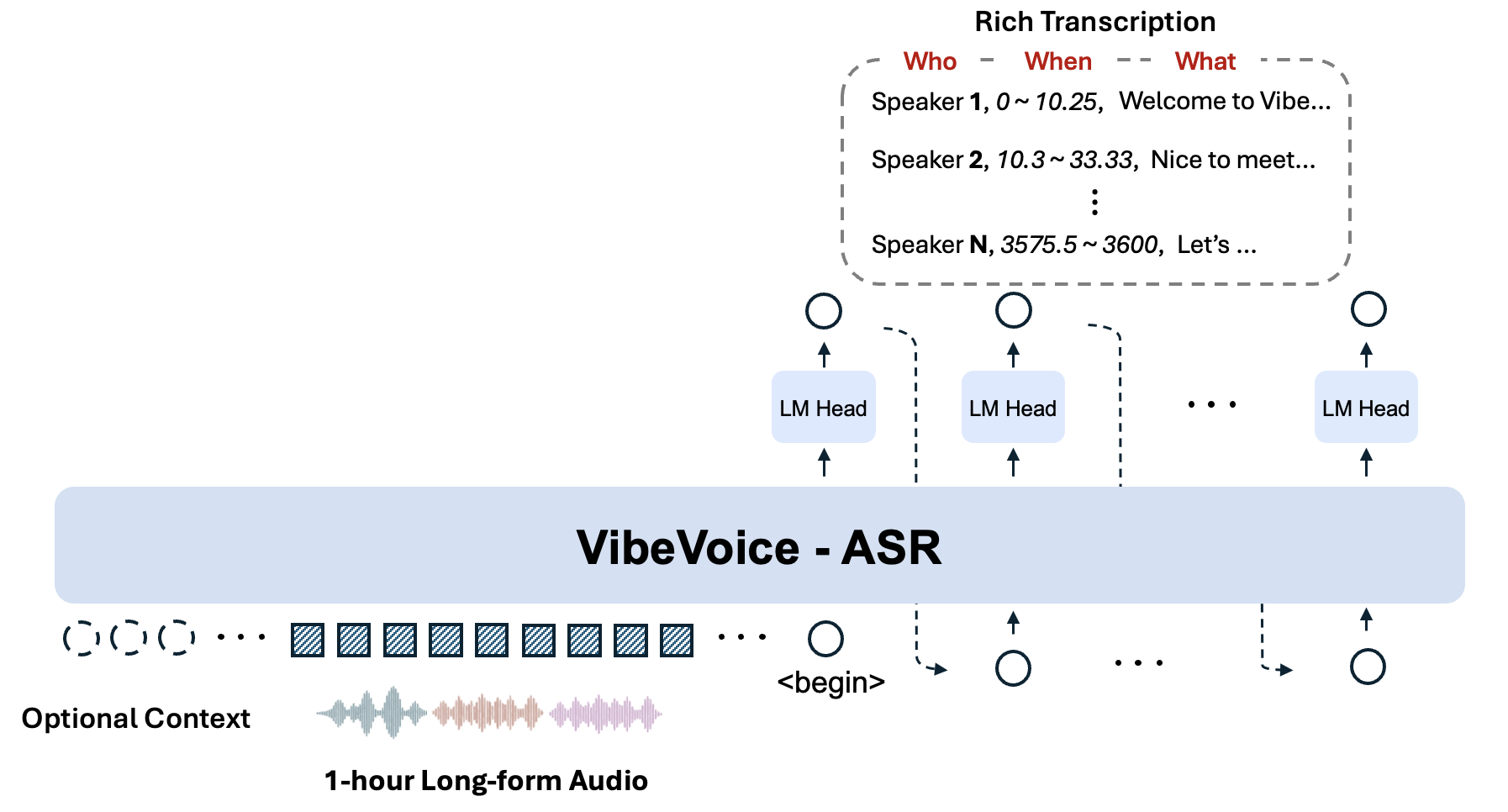
It is a unified speech-to-text model designed to handle **1-hour long-form audio** in a single pass, generating structured transcriptions containing **Who (Speaker), When (Timestamps), and What (Content)**, with support for **User-Customized Context**.
## 🔥 Key Features
- **🕒 60-min Single-Pass Processing**:
Unlike conventional ASR models that slice audio into short chunks (often losing global context), VibeVoice ASR accepts up to **60 minutes** of continuous audio input within 64K length. This ensures consistent speaker tracking and semantic coherence across the entire hour.
- **👤 Optional Context Injection**:
Users can provide customized context (e.g., specific names, technical terms, or background info) to guide the recognition process, significantly improving accuracy on domain-specific content.
- **📝 Rich Transcription (Who, When, What)**:
The model performs ASR, Diarization, and Timestamping simultaneously. The output is a structured sequence indicating *who* said *what* at *which time*.
## 🏗️ Model Architecture
## Evaluation
## Installation
We recommend to use NVIDIA Deep Learning Container to manage the CUDA environment.
1. Launch docker
```bash
# NVIDIA PyTorch Container 24.07 ~ 25.12 verified.
# Previous versions are also compatible.
sudo docker run --privileged --net=host --ipc=host --ulimit memlock=-1:-1 --ulimit stack=-1:-1 --gpus all --rm -it nvcr.io/nvidia/pytorch:25.12-py3
## If flash attention is not included in your docker environment, you need to install it manually
## Refer to https://github.com/Dao-AILab/flash-attention for installation instructions
# pip install flash-attn --no-build-isolation
```
2. Install from github
```bash
git clone https://github.com/microsoft/VibeVoice.git
cd VibeVoice
pip install -e .[asr]
```
## Usages
### Usage 1: Launch Gradio demo
```bash
apt update && apt install ffmpeg -y # for demo
python demo/vibevoice_asr_gradio_demo.py --model_path microsoft/VibeVoice-ASR --share
```
### Usage 2: Inference from files directly
```bash
python demo/vibevoice_asr_inference_from_file.py --model_path microsoft/VibeVoice-ASR --audio_files [add a audio path here]
```
## 📄 License
This project is licensed under the [MIT License](../LICENSE).